Category: iOS
. Apple sure don’t help themselves with their choice of menus. Their classic habit of referring to “folders” in the Mail application as “mailboxes” has always been a head scratcher for me. Last year it became apparent that those who use iPad or iPhone can save documents to cloud based services like Dropbox. All of …
Continue reading
Permanent link to this article: https://macservicesact.com.au/apple-dont-make-it-obvious-but-it-can-be-done/
If you have recently upgraded to iOS6 you might be wondering if you’ve done the right thing because according to the press it is a disaster. There is a lot of whining but the majority of it seems to be focused on the replacement of google maps for Apple Maps. One Lunatic spent a good …
Continue reading
Permanent link to this article: https://macservicesact.com.au/my-tyre-is-flat-so-i-am-selling-my-car-wait-what/
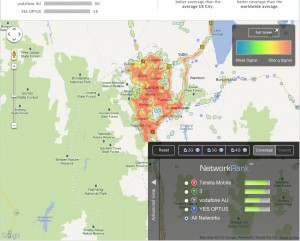
I have long maintained- if you own a smartphone- that Telstra really is the only choice of carrier. This recommendation doesn’t come without a great deal of handwringing as I know they come with a whole host of issues- but signal speed and strength isn’t one of them. Their customer service for a example is …
Continue reading
Permanent link to this article: https://macservicesact.com.au/here-is-why-telstra-is-really-the-only-choice/
Kids love iPhones, iPads and iPods and they can be a great way to keep the kids occupied. Unfortunately while they are amusing themselves with your iPhone there is every possibility that they might delete Apps or maybe even purchase a few. You know kids – they are amazingly clever when it comes to stuff like …
Continue reading
Permanent link to this article: https://macservicesact.com.au/if-you-are-around-kids-and-you-have-an-iphone/
There is no doubt that the screen on an iphone is sharp and the icons clean and precise. But with a screen only 3.5 inches it can be hard to see your emails or messages. Fortunately there is a simple way to make your text bigger and easy to see. 1. Tap on Settings 2. …
Continue reading
Permanent link to this article: https://macservicesact.com.au/no-more-squinting/